Multi-Template Work Items Overview
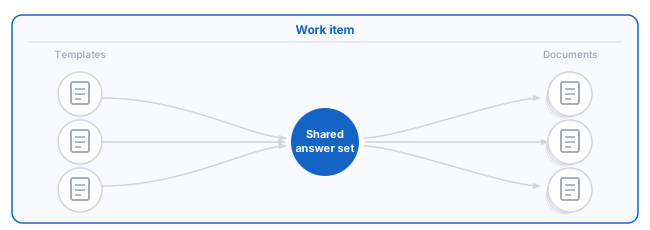
You can attach more than one template to a work item. A multi-template work item shares a single answer set, enabling you to assemble related documents without copying answers or duplicating the work item.
Overview
Attaching multiple templates to a work item lets you manage related documents that rely on the same client, matter or transaction information. Advance collects answers once and reuses them across all attached templates whenever you assemble documents.
Multi-template work items are intended for users who assemble multiple related documents from shared client or matter data, and for administrators designing streamlined document workflows.
This approach eliminates the need to maintain separate answer sets and helps ensure documents remain aligned as information changes.
Preview Feature
The implementation of multi-template work items in the current version is a preview.
As a preview feature, multi-template work items are intended for evaluation and early adoption. Feature behavior, limitations and integration support may change before general availability.
The following features are not currently available when using work items with multiple templates:
• iManage integration
• Client interviews
• Image variables (answer packages are not supported)
• Work item versions
• Default answers
The above features are currently being worked on and will be released incrementally.
Workflow
Work items with multiple templates fit into the broader Advance workflow as a way to organize related documents under one shared context.
Before attaching multiple templates to a work item, an administrator must:
Once enabled, you create one work item to represent the client or matter, and then attach the templates associated with that work. The answers collected in the work item become the shared answer set that all templates reuse during assembly.
All standard work item actions still apply. You can open interviews, edit answers, assemble and reassemble them as needed.
Previously assembled documents do not update automatically when answers change. Reassembly is required to reflect updated information.
Key concepts
Attaching multiple templates to a work item extends the standard work item model. Like any other work item, a multi-template work item stores the answer set, its assembled documents and activity history. For an introduction to work items in general, see Work Items Overview.
Shared Answer Set
A work item with multiple templates uses one shared answer set. Answers are collected once and reused across all attached templates. When a template requires information that is not yet present, Advance prompts for those answers during interview or assembly and adds them to the shared answer set. This model reduces duplication and helps keep related documents consistent as information changes.
Template Independence
Although templates share an answer set, they remain logically independent. Each template:
- Uses only the variables it asks.
- Applies its own logic, calculations and structure.
- Assembles documents independently of other templates.
Changes to one template do not affect the behavior, content or output of other templates attached to the work item.
Variables and Naming
All answers are stored in one answer set, but each template only uses the variables asked by that template.
Using a shared answer set works best when templates are designed with consistent variable names and data types. When variable names differ across templates, Advance treats them as separate questions even if they represent the same concept, which can reduce the benefits of reuse.
Template authors should coordinate variable naming when templates are intended to be used together.
Answer Collection and Reuse
Answers are added to the shared answer set incrementally as templates are used. Once an answer exists, it is reused automatically whenever another attached template references the same variable.
Scope and Limitations
The shared answer set applies only within a single work item. Answers are not shared across work items, even if the same templates are attached. To share answers across work items, use default answers.
In the current preview implementation, some standard work item features - such as versions, default answers and certain integrations - are not available, which may affect how shared answer sets can be used.
Usage Scenarios
Attaching multiple templates to a work item is most effective when:
- Several documents rely on the same client, matter, or transaction details
- Templates share variable names
- You want to avoid maintaining multiple answer sets
- Documents are generated in stages
Common scenarios
- Document bundles – A matter requires a set of related documents, such as engagement letters, authority forms, agreements, schedules, and completion documents.
- Progressive work – Documents are created at different stages of a matter, allowing answers in the work item to be updated and reused as work progresses.
- HotDocs Classic workflows – Users who previously worked with a single answer set for multiple templates in HotDocs Classic can follow a similar pattern in Advance by attaching multiple templates to one work item.
Integrations
- API integrations, including post-processing, with API 1.1 are not supported.
- API 2.0 is required for integration support with multiple template work items.
- Work items using multiple templates are not visible to API 1.1.
- Integrations with Mitratech TAP or TeamConnect are not fully supported in the preview release.